How the TikTok Algorithm Works in 2026
Published September 30, 2026 · Updated September 30, 2026 · 8 min read
People talk about the TikTok algorithm as if it were one secret formula. TikTok describes it more plainly: a recommender system that picks from a pool of eligible videos and ranks them by how likely you are to be interested in each one. Most of what matters is on TikTok's own Help Center and in its Community Guidelines, and the guidelines changed this year. This guide sticks to what TikTok has published, checked on September 30, 2026, and marks clearly where the popular advice goes further than the source.
See why one TikTok took off
Paste a public link and get its hook, structure and call to action.
What Is the TikTok Algorithm?
It is the system that decides what appears in your For You feed, the endless stream TikTok opens on. TikTok's Help Center calls it a set of recommender systems, one for each feed: For You, Following, Friends and LIVE. Each one selects from a large collection of eligible content and ranks it by predicted interest.
Two ideas explain most of its behaviour. First, it learns from you: every like, share, comment, rewatch and skip is a signal about what to show next. Second, it learns from people like you. TikTok gives its own example: if one user likes videos 1, 2 and 3, and another likes videos 1 to 5, the system may predict that the first user will also like videos 4 and 5.
That is why no two For You feeds are the same, even when everyone seems to be watching the same trend. It also explains why a new account with no followers can get views, and even go viral on TikTok: the system is matching a video to viewers who may like it, not only to the people who chose to follow the creator.
TikTok also works against repetition on purpose. Its newsroom explained in 2020 that the feed generally will not show two videos in a row made with the same sound or by the same creator, and that it avoids duplicated content, videos you have already seen and spam. The same post says the feed sometimes shows videos outside your usual interests, so you can discover new creators and topics.
The Ranking Signals That Matter
TikTok's Help Center groups what shapes your For You feed into three kinds of information.
| Kind of signal | Examples TikTok gives | Weight |
|---|---|---|
| User interactions | videos you like, share, comment on, watch in full or skip; accounts of followers you follow back | generally weighted most heavily |
| Content information | sounds, hashtags, the number of video views, the country where it was published | helps match the video to viewers |
| User information | device settings, language preference, location, time zone and day, device type | lower weight, per TikTok's 2020 post |
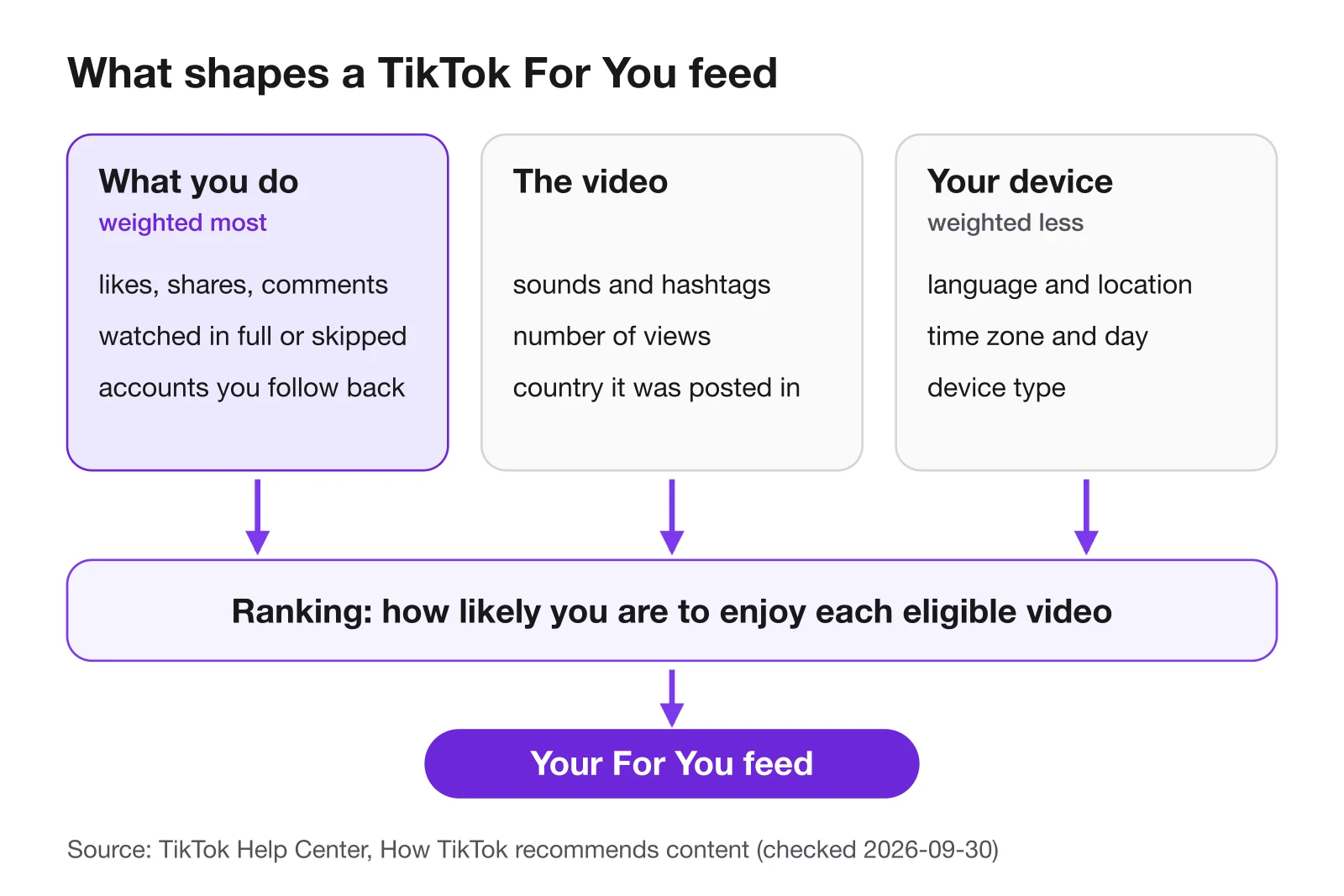
The clearest example TikTok has given of a strong signal is completion. Its 2020 explanation says a strong indicator of interest, such as whether a user finishes watching a longer video from beginning to end, gets more weight than a weak one, such as whether viewer and creator are in the same country. The Help Center adds that time spent watching can be part of those interactions.
Two things are missing from that list, and TikTok says so directly. Neither follower count nor a history of high-performing videos is a direct factor in the recommendation system. A big account still tends to get more views, simply because more people follow it and see its posts, but the ranking itself is about each video and each viewer.
What the popular guides add on top, such as a fixed number of hashtags, a best time to post, or a video being tested on followers before strangers, does not appear on the TikTok pages cited here. Treat those as habits that worked for someone, and test them on your own account before you rely on them.
Before Ranking: The Eligibility Check
Ranking only happens among eligible videos. TikTok's Community Guidelines describe For You feed eligibility standards, and a video that falls under them is not recommended in the For You feed, even though it stays on TikTok.
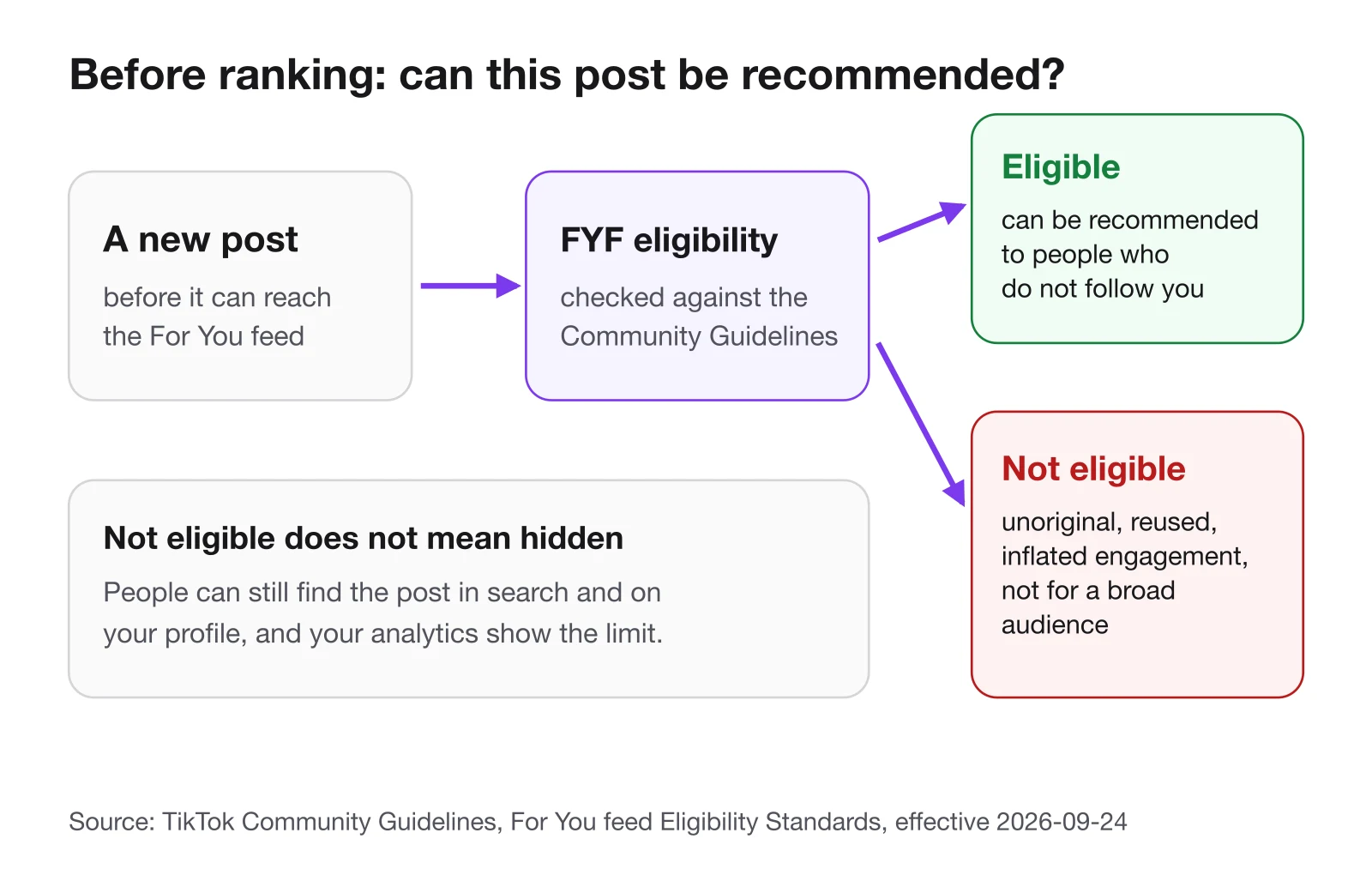
The guidelines in force since September 24, 2026 mark these, among others, as ineligible:
- Unoriginal or reused material. Content that includes unoriginal or reused material without anything new is not eligible.
- Manipulated engagement. Content that tries to manipulate people into giving gifts or inflating likes or follows is not eligible, and TikTok removes fake likes and followers it detects.
- Content that may not suit a broad audience. Each section of the guidelines has its own FYF Ineligible list for this.
Two details from the same page are easy to miss. A video that is ineligible can still be found through search or on the creator's profile. And a video that gets few views has not necessarily broken a rule: creators can check TikTok's analytics to see whether any post was made ineligible for recommendation.
Watch the accounts in your niche
Competitor Watch emails you when one of their posts beats that account's usual.
What Changed in 2026
For viewers in the US, the joint venture is the change to watch: the company says the algorithm will be retrained on US data, which means US feeds may drift from feeds elsewhere over time. For creators everywhere, the guideline update matters more day to day. Reposting other people's clips without adding anything new was always a weak strategy, and the guidelines in force since September 24 name it as a reason a post stays out of the For You feed.
TikTok also requires a label on AI-generated or significantly edited content that shows realistic scenes or people. If you use AI in your videos, label it at upload, because unlabeled content may be removed, restricted or labeled by TikTok.
How to Reset Your TikTok Algorithm
If your feed has filled up with things you no longer want, TikTok has a built-in reset. According to its Help Center, refreshing the For You feed shows you some popular content, and your reactions to it reshape your recommendations from there.
- Open your profile. In the TikTok app, tap Profile at the bottom.
- Open settings. Tap the menu button at the top, then Settings and privacy.
- Go to Content Preferences. Tap Content Preferences, then Refresh your For You feed.
- Confirm. Follow the steps on the screen. A refresh cannot be undone.
In some regions there is a shorter path: press and hold a post in the feed or tap Share, then Why this video, Adjust your For You, and Refresh your For You feed. A refresh only affects the For You feed; your Following feed, profile, inbox and ads stay as they were.
A full reset is rarely needed. Tapping Not interested on a post, filtering keywords and hashtags you do not want, and adjusting topics in Manage topics all steer the feed without throwing away what it already learned about you.
What This Means When You Post
Put together, TikTok's own descriptions point to a short list of things a creator controls.
Earn the watch. Finishing a video is the example of a strong signal TikTok itself gives, and skipping is a signal too. A clear opening, no slow warm-up and an ending that pays off the promise do more for ranking than any caption trick.
Give people a reason to share or comment. Shares and comments are interactions the Help Center lists by name, and research on what makes a video go viral points to the feelings that make people share. A question the video leaves open, a tip worth sending to a friend or a take people want to answer all create them honestly.
Describe the video accurately. Sounds, hashtags and captions are content information the system uses to match a video with viewers. Hashtags that describe the video help; hashtags that describe something else can send it to the wrong people, who then skip it.
Keep it original. Reused clips with nothing new added are not eligible for the For You feed. If you build on someone else's video, add your own commentary, test or angle, and credit the source.
Judge a video against your own usual. Because follower count is not a direct factor, a small account can have a breakout, and a large account can have a quiet week. The useful question is whether a video did better than your recent average, and what it did differently.
Study the ones that worked. When a post in your niche beats its account's usual views, which TikTok competitor tracking can flag for you, read what was said in the first seconds, how the middle was structured and how it asked for the follow or the click. That is the part of the algorithm you can learn from, because it is the part viewers reacted to.
FAQ
What is the 3 second rule on TikTok?
It is a rule of thumb among creators, not a TikTok policy: a video has about three seconds to stop the scroll. TikTok does say that finishing or skipping a video is a signal, so the opening decides whether viewers stay.
How to trigger the TikTok algorithm?
There is no switch to press. Post original videos that meet the For You feed standards and that viewers watch to the end and share. If a post gets no reach, check TikTok analytics to see whether it was made ineligible.
Why is my TikTok algorithm so bad now?
Your feed follows your recent behaviour, so a few long watches of one topic can take over. Tap Not interested on posts you dislike, filter keywords, adjust Manage topics, or refresh the For You feed if it no longer fits.
Is 20,000 views considered viral?
TikTok has no official number for viral. Twenty thousand views is a breakout for an account that usually gets five hundred, and an ordinary day for one that gets a million. Compare a video with the account's own usual views.
Sources
- TikTok Help Center: how TikTok recommends content — checked September 30, 2026
- TikTok Newsroom: how TikTok recommends videos #ForYou (June 18, 2020) — checked September 30, 2026
- TikTok Community Guidelines: For You feed eligibility standards (effective September 24, 2026) — checked September 30, 2026
- TikTok Community Guidelines: integrity and authenticity — checked September 30, 2026
- TikTok Newsroom: announcement from the TikTok USDS Joint Venture (January 23, 2026) — checked September 30, 2026
- TikTok Newsroom: more ways to spot, shape and understand AI-generated content (November 19, 2025) — checked September 30, 2026
- TikTok Help Center: refresh your For You feed — checked September 30, 2026
Break down a TikTok that worked
Hook, structure, key frames and call to action from one public link.
Keep reading
- How to Go Viral on TikTok How to go viral on TikTok in 2026: what TikTok says it rewards, why followers matter less than you think, and how to study the videos that worked.
- TikTok Hooks: 50 Opening Lines and Why They Work TikTok hooks for 2026: 50 opening lines sorted by the seven hook types, why each type holds viewers, and how to test a hook before you build a video on it.
- TikTok Tools for Creators and Marketers The TikTok tools creators and marketers use in 2026 for research, editing, captions, scheduling and analytics, with prices checked on each official site.