TikTok Competitor Analysis
Add the accounts you compete with. We check their new posts twice a day and email you when one breaks out.
- In every plan
- No credits spent
- Checked twice a day
- Email alerts
TikTok competitor analysis is mostly a timing problem. The video worth studying is the one that is taking off right now, and by the time TikTok's algorithm puts it on your For You page it is days old. ViralDrop's Competitor Watch follows the accounts you choose, measures every new post against that account's own usual numbers, and emails you when one of them breaks out, while it is still worth reacting to.
How TikTok Competitor Tracking Works
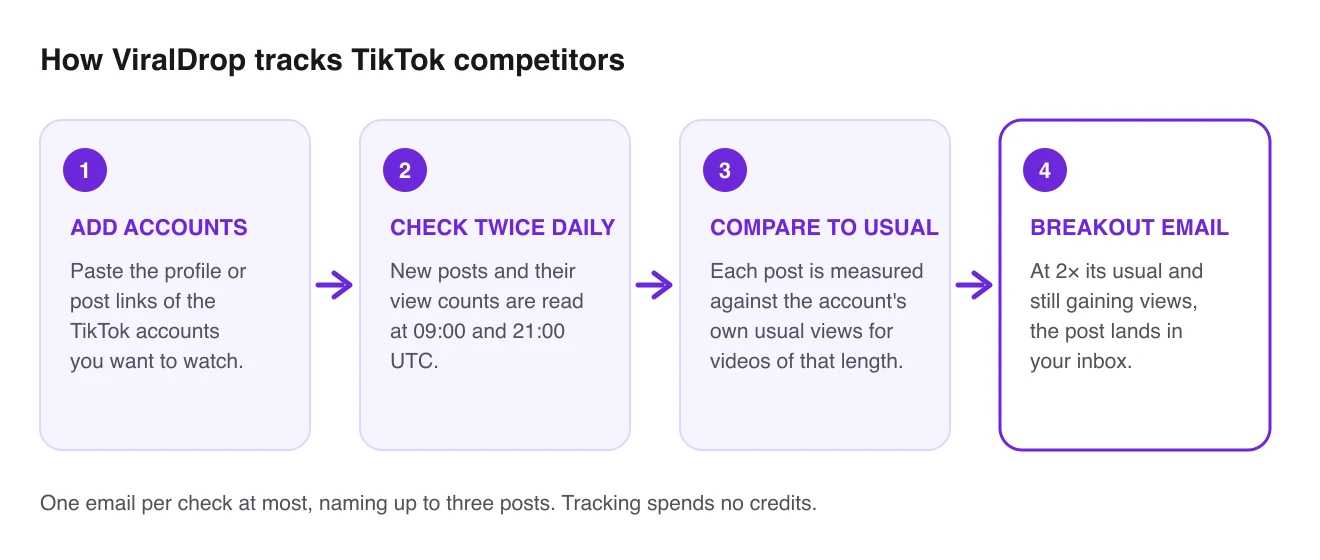
- Add the accounts. Paste the profile links of the TikTok creators or brands you compete with, or a link to any of their posts.
- We check twice a day. At 09:00 and 21:00 UTC, ViralDrop reads each account's new posts and their view counts.
- Each post is compared with its own account. A video's views are set against the account's usual views for videos of the same length, not against other creators.
- You get an email when one breaks out. A post at twice its account's usual or more, and still gaining views, is sent to your inbox.
What You Get With TikTok Competitor Tracking
Free in every plan
Tracking is included in every ViralDrop plan and never spends credits. The Free plan tracks up to 10 accounts.
A normal for each account
A small creator's breakout and a big brand's routine post look alike in raw views. Comparing each account with itself tells them apart.
Short and long kept apart
Videos under and over three minutes are compared only with their own kind, so a long video never makes the short ones look like hits.
One quiet email, not a stream
At most one email per check, naming up to three posts. You can turn the alerts off with one checkbox.
A feed ranked by how unusual a post is
Every tracked video sits in one feed, sorted by how far it runs above its account's normal, with filters for platform and length.
From alert to breakdown in a click
Open any video in the feed to analyze its hook and structure, or pull its transcript, on the same credits you use everywhere else. The TikTok summarizer gives the gist of one in a few lines.
How to Analyze TikTok Competitors
Tracking tells you when something happened. Analysis is deciding what it means for your next video. Once the list is set up, the routine takes a few minutes a week.
1. Pick accounts that fight for the same viewer
Start with five to ten accounts. On TikTok a competitor is any account that talks to your viewer about the same problem, whether or not it sells what you sell. Mix direct rivals, creators your audience already follows, and one or two accounts a size above you whose formats you would like to earn.
2. Give each account time to show its normal
A breakout only means something against a baseline. ViralDrop marks a new account as learning until it has watched enough of its videos from the day they were posted. Until then, read the view counts as numbers, not verdicts.
3. Check what the video borrowed from TikTok
Many TikTok spikes ride something outside the idea: a sound that is climbing, a trend format, a stitch or duet of a bigger post. Look at the sound and the caption on TikTok before you credit the idea; what makes a video go viral is often more than the idea itself. A spike that rides a sound fades with it; one built on a topic or a hook can be repeated.
4. Compare the first seconds
TikTok viewers decide within seconds whether to keep watching, so the opening is where two breakouts differ most. An analysis lays out the hook and its type, the structure and the call to action, so you can set two openings side by side without rewatching either.
5. Look for the same format across accounts
One account's spike can be luck. When two accounts break out with the same format in the same week, the format is the signal. Write one line per breakout (account, date, format, likely reason) and read the list once a month.
6. Make your own version
Take the structure, never the content. Rewrite on ViralDrop starts from the video link, keeps the structure, and writes new scripts for your product and audience.
TikTok Competitor Analysis FAQ
How does ViralDrop decide a post went viral?
It compares the post's views with the same account's recent posts of a similar length, not with other creators. A post at twice that account's usual views or more, still gaining since the last check, counts as a breakout.
How often are tracked accounts checked?
Twice a day, at 09:00 and 21:00 UTC. Each check reads the new posts and current view counts, and an alert email, if there is one, goes out after the check.
Does tracking cost credits?
No. Competitor tracking is included in every plan and never spends credits. Credits are used only when you run a tool on a video, such as an analysis or a transcript.
How many accounts can I track?
It depends on your plan; the pricing page lists the number for each one. The Free plan tracks up to 10 accounts, and pauses tracking if you do not log in for a week.
Which platforms can I track?
TikTok, Instagram and YouTube. You can mix them in one list, and the feed lets you filter by platform, so your TikTok competitors can sit beside the same brands' Reels and Shorts. The guide to analyzing Instagram competitors adds a template for Reels.
Do I need to connect my TikTok account?
No. You paste public links to the accounts you want to watch, and ViralDrop reads their public posts. Your own TikTok account is never connected and never asked for.
Can I track a private TikTok account?
No. Only public accounts can be tracked, because only their posts and view counts are visible to anyone. A private account cannot be added.
Why does a new account say it is still learning?
A breakout needs a baseline, and the baseline needs enough of the account's videos watched from the day they were posted. Until then the feed shows the numbers, but no breakout verdict.
Can ViralDrop find competitors I do not know yet?
Yes. Niche discovery in Competitor Watch takes a few words about your niche, suggests search keywords for you to review, then looks for matching accounts. You approve each account before it is added to your list.
Can I turn off the alert emails?
Yes. A checkbox on the Competitor Watch page switches breakout emails off, and every alert email links back to it. Tracking and the feed keep working, so you can still check the rankings yourself.
Start Tracking TikTok Competitors
Add the accounts you compete with and get the first breakout email when one takes off.