Social Media Manager Tools: The Stack That Actually Gets Used
Published September 30, 2026 · Updated September 30, 2026 · 11 min read
Most lists of social media manager tools recommend twenty products or more. In practice a manager opens four or five a day: a scheduler, the analytics inside it, a design tool, and something to keep an eye on competitors. The rest get tried once and cancelled. This guide covers that working stack, what each tool costs, and which combination fits a freelancer, a small business or an agency.
All prices and plans were checked on each tool's own pricing page on September 30, 2026. Where a price depends on billing, we say whether it is monthly or yearly.
Know When a Competitor's Post Takes Off
Add the accounts you watch and get an email when one of their videos breaks out.
Social Media Manager Tools at a Glance
| Tool | Best for | Key feature | Price (checked Sep 30, 2026) |
|---|---|---|---|
| ViralDrop | short-form competitor research | viral breakdowns, breakout emails | plans from $9/mo; tracking in every plan |
| Buffer | free and low-cost scheduling | per-channel pricing | free for 3 channels; from $5/mo per channel, billed yearly |
| Metricool | analytics with competitor benchmarks | competitor profiles and reports | free for 1 brand; from $20/mo, billed yearly |
| Later | visual planning for Instagram and TikTok | calendar, link in bio | from $18.75/mo, billed yearly; 14-day trial |
| Hootsuite | teams managing many accounts | unified inbox, listening, approvals | from $99/user/mo, billed yearly; 14-day trial |
| Sprout Social | larger teams and customer care | smart inbox, reporting, listening add-ons | from $79/seat/mo, billed yearly; 30-day trial |
| Canva | graphics, carousels and video covers | templates, brand kits, social scheduling on Pro | free plan; Pro and Business priced by region |
Among social media scheduling tools, free plans are the exception rather than the rule: of the schedulers above, only Buffer and Metricool have one.
How We Chose
We looked at what a social media manager does in a normal week: plan and schedule posts across platforms, make the graphics and short videos with content creator tools, answer comments, report results, and keep up with what competitors and trends are doing. For each job we chose tools that are widely used, publish their prices, and have either a free plan or a trial.
Everything on this page comes from each tool's own website. We did not use review scores, user counts or screenshots of other companies' pages. Prices change often, so each figure carries the date we checked it, and the links go to the current plan pages.
ViralDrop is our own product. It is listed first because it covers the research job, which the schedulers do not, and its card sticks to what it actually does.
The Tools
ViralDrop
Best for: knowing what is working for competitors on TikTok, Instagram Reels and YouTube Shorts before you plan the week.
Add the competitor accounts you follow and ViralDrop checks their new posts twice a day, at 09:00 and 21:00 UTC, against each account's own normal for videos of the same length. When a post takes off, you get an email; each email names up to three posts. Paste any public video to see why it worked: its key frames, the text on screen, the transcript, and the hook, body and call to action. A rewrite turns that structure into a script for your client, and Trends Research shows what a client's niche is posting across TikTok, Reels and Shorts, with ideas for what to film next.
- Pros: competitor tracking included in every plan, with no credits spent; works on the three short-form platforms; up to 20 videos can be analysed at once.
- Cons: it does not schedule or publish; public videos only.
- Price: plans from $9 a month for 100 credits; an analysis costs 5 credits; new accounts get free welcome credits.
Buffer
Best for: freelancers and small teams who want a simple scheduler that stays cheap.
On the free plan you get three channels, a queue of ten posts on each, an AI assistant and basic insights. Essentials adds unlimited scheduled posts, advanced analytics, a hashtag manager and first-comment scheduling. Team adds unlimited team members, access levels and content approval workflows.
- Pros: a real free plan; pricing per channel, so you pay for exactly the accounts you run.
- Cons: lighter on social listening and inbox features than the enterprise suites.
- Price: $0 for three channels; Essentials is $5 and Team $10 per channel a month on yearly billing, each with a 14-day trial.
Metricool
Best for: reporting and competitor benchmarks on a small budget.
Metricool's free plan manages one brand's networks, except LinkedIn and X, with up to 20 scheduled posts a month, 30 days of analytics and five competitor profiles. Starter raises that to unlimited publishing, up to 100 competitors and analytics with unlimited history, with PDF and PowerPoint reports. Advanced adds team and client management, approvals and an API.
- Pros: competitor benchmarks even on the free plan; client-ready reports.
- Cons: the free plan's 30 days of history is short; LinkedIn needs a paid plan.
- Price: $0 for one brand; paid tiers start at $20 (Starter) and $53 (Advanced) a month on yearly billing.
Later
Best for: managers who plan visually, especially for Instagram and TikTok.
Later publishes to eight networks, including Threads, Pinterest and Snapchat as well as the usual four. Its entry plan covers one profile per network, 30 scheduled posts each, best times to post and a link-in-bio page. Growth adds a second set, collaboration and approvals, a social inbox and a year of analytics. Scale adds competitive benchmarking and brand mentions.
- Pros: strong visual calendar; approvals on Growth.
- Cons: no free plan; post limits on Starter.
- Price: $18.75 a month for Starter on yearly billing, $37.50 for Growth and $82.50 for Scale; every plan starts with a 14-day trial.
Hootsuite
Best for: teams that manage many accounts and need one inbox for all of them.
Hootsuite's Standard plan manages up to ten social accounts from one calendar, with unlimited scheduling, AI post generation, one inbox for messages and brand monitoring. Professional adds unlimited accounts, automated inbox replies and custom reports. Advanced adds approvals and team routing.
- Pros: a full suite: publishing, inbox, listening and reporting in one place; trial with no credit card.
- Cons: priced per user, which adds up quickly for a team.
- Price: Standard from $99, Professional $199 and Advanced $399 per user a month, billed yearly; 14-day free trial.
Sprout Social
Best for: larger teams where social media is also customer service.
Sprout Social's Essentials plan connects five profiles, with optimal send times and profile and post reporting. Standard adds a consolidated inbox, keyword monitoring and review management; Professional adds unlimited profiles and competitor insights; Advanced adds sentiment and helpdesk integrations.
- Pros: strong inbox and reporting; add-ons for listening and employee advocacy.
- Cons: the most expensive option here; priced per seat, and the headline prices assume yearly billing.
- Price: Essentials $79 per seat a month billed yearly ($99 monthly); Standard $199, Professional $299, Advanced $399 per seat a month; 30-day free trial.
Canva
Best for: the graphics, carousels and covers every schedule needs.
Canva's free plan includes the editor, a large template library and one brand kit. Pro is where a manager usually lands: premium templates, five brand kits for five clients, resize and background removal, and a built-in scheduler. Business adds team admin and approvals.
- Pros: most clients can edit a Canva design themselves; templates in every social size.
- Cons: its scheduler is basic next to a dedicated one.
- Price: free to start; Canva shows Pro and Business prices in your local currency.
Best Social Media Management Tools for Small Business
A small business usually has one person doing social media next to three other jobs. The tools need to be cheap, quick to learn, and cover the platforms the business actually uses.
A setup that fits most small businesses:
- Canva Free for posts, stories and covers, using the brand kit so every graphic matches.
- Buffer Free to schedule three channels, or Metricool Free if you also want competitor benchmarks for one brand.
- The platforms' own apps for replying to comments and messages.
- ViralDrop to check what similar businesses post on TikTok and Reels, and to break down the videos that work before making your own.
That costs nothing until the business needs more channels or more history. The first upgrade is usually the scheduler, when three channels are no longer enough or the owner wants someone else to approve posts.
Small businesses should be careful with per-user pricing. A suite priced per seat looks affordable for one person and doubles the moment a second person needs access. Buffer and Metricool price by channel or brand instead, which suits a small team better.
Break Down a Competitor's Best Video
Paste a TikTok, Reel or Short and see its hook, structure and call to action.
Free Social Media Manager Tools
Here is what the free plans on this page include, so you can build a free stack before paying for anything:
| Tool | Free plan includes |
|---|---|
| Buffer | 3 channels, 10 scheduled posts per channel, basic insights |
| Metricool | 1 brand, 20 scheduled posts a month, 30 days of analytics, 5 competitors |
| Canva | the editor, templates, 1 brand kit |
| ViralDrop | free welcome credits, enough for one analysis |
Later, Hootsuite and Sprout Social have trials instead: 14 days for Later and Hootsuite, 30 for Sprout Social. A trial is useful to test a workflow, but plan the switch-over before it ends, because the posts you schedule during a trial are part of the data you would lose.
Where ViralDrop Fits: Research Before You Schedule
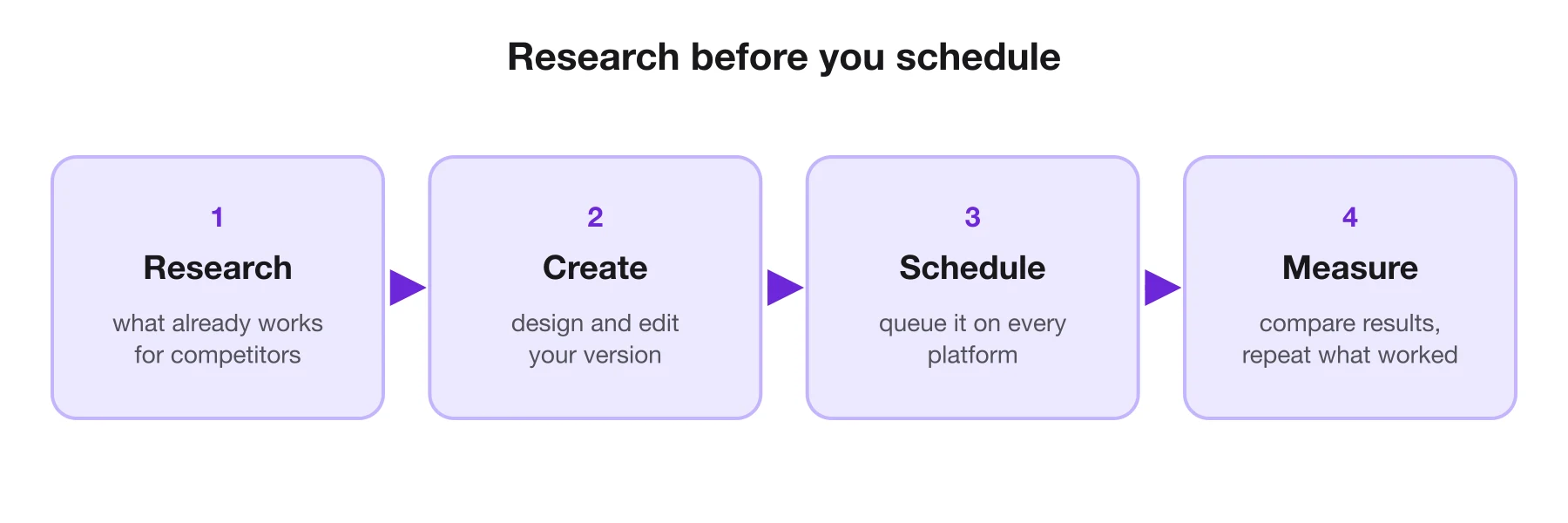
Schedulers are very good at the second half of the job: publishing on time and reporting what happened. They are less helpful with the first half, which is deciding what to publish. Most managers fill that gap by hand, scrolling competitors' profiles on a Monday morning.
That is the job ViralDrop does, on TikTok and Instagram alike. Add the competitor accounts a client cares about, and it checks their new posts twice a day against each account's own normal, so a video that is doing unusually well for that account stands out even if the account is small. When one breaks out you get an email, and you can open a breakdown of why it worked: the hook, the key frames and on-screen text, and what it asks viewers to do at the end.
The result feeds straight into the rest of the stack. The insight becomes a brief, the brief becomes a Canva design or a short video, and the scheduler publishes it. The research just happened first, on real evidence instead of a guess, and the client can see in the brief which competitor video the idea came from and why it was chosen.
Signs You Have Outgrown Your Tools
Switching tools costs a week of setup, so it is worth doing only when the current stack is really holding you back. These are the usual signals:
- You copy the same post into several places by hand. A scheduler that covers all your platforms pays for itself in saved hours.
- Clients or managers approve posts in chat threads. Approval workflows on Buffer Team, Later Growth, Hootsuite Advanced or Metricool Advanced keep the history in one place.
- Your monthly report takes a day to build. Tools with exportable or scheduled reports cut that to minutes.
- You hear about a competitor's viral video from your client. That is a research gap, not a scheduling one, and tracking with alerts closes it.
- You pay for three tools that each do half of the same job. Consolidate before adding a fourth.
What a Weekly Report Should Show
Whatever tools you use, a short weekly report keeps a client or a manager on your side. It needs only four parts:
- What went out. The number of posts per platform, and anything that was planned but not published.
- What worked. The two or three posts that beat the account's own average, and a line on why you think they did.
- What competitors did. Any competitor post that took off, with its hook and format, and whether it suggests something to try.
- What happens next. The plan for the coming week, with one change based on what you learned.
The second and third parts are where the report earns its keep. Numbers alone describe the past; a reason and a next step make it useful.
How to Build the Stack by Team Size
Freelancer with a few clients. Buffer or Metricool on a free or low plan, Canva, and a research tool for the clients who compete on short-form video. Keep one login per tool and use workspaces or brands to separate clients.
In-house manager for one brand. Later or Buffer for scheduling, Canva Pro for brand kits, the platforms' own analytics, and competitor tracking for the five to ten accounts your brand watches most closely.
Agency. A suite with approvals and client reports, such as Hootsuite, Sprout Social or Metricool Advanced, plus research that scales across every client's competitors. At agency size the deciding factor is usually the reporting: whatever produces the client report fastest wins. Test that with a real client's data during the trial, not with a demo account, because the report is what the client will judge you on every month.
FAQ
What tools do social media managers use?
Most use a scheduler such as Buffer, Later or Hootsuite, a design tool like Canva, the platforms' own analytics, and a way to follow competitors. Many add a research tool to see which competitor videos are working.
What are 10 popular social media tools?
Common choices include Hootsuite, Sprout Social, Buffer, Later, Metricool, Canva, CapCut, TikTok Studio, Meta Business Suite and ViralDrop. Each covers a different part of the job, so most managers use only a few of them.
What is the 5-5-5 rule for social media?
It is an informal habit, not a standard, and people define it differently. A common version is to comment on five posts, reply to five people and share five pieces from others each day, to stay active in your community.
What are the big 4 of social media tools?
There is no official list. The phrase usually refers to the best-known all-in-one schedulers, such as Hootsuite, Sprout Social, Buffer and Later. Which four matter for you depends on your budget and platforms.
Sources
- ViralDrop pricing — checked September 30, 2026
- Buffer pricing — checked September 30, 2026
- Hootsuite plans — checked September 30, 2026
- Sprout Social pricing — checked September 30, 2026
- Later pricing — checked September 30, 2026
- Metricool pricing — checked September 30, 2026
- Canva pricing — checked September 30, 2026
Keep reading
- Best AI Video Summarizers in 2026, Compared The best AI video summarizer for 2026 depends on the video: short-form clips, long YouTube lectures or meetings. Six tools compared from their own pages.
- Content Creator Tools: What to Use at Each Step Content creator tools for every step of a short video in 2026: research, scripting, editing, design and publishing, with prices from each official site.
- How to Repurpose Video Content How to repurpose video content: turn one video into clips, posts and scripts without tripping the originality rules TikTok and Instagram tightened in 2026.