Instagram Competitor Analysis
A social media competitor analysis tool that watches rival Instagram accounts and emails you when a post outruns its own normal.
- Included in every plan
- No credits spent
- 09:00 and 21:00 UTC checks
- Breakout emails
Instagram competitor analysis usually means scrolling a rival's grid and guessing which Reel did well. The grid hides the answer: a big number may be ordinary for that account, and a modest one may be its best post all month. Competitor Watch keeps a record of each account you add and emails you when a new post climbs well above that account's normal.
How Instagram Competitor Tracking Works
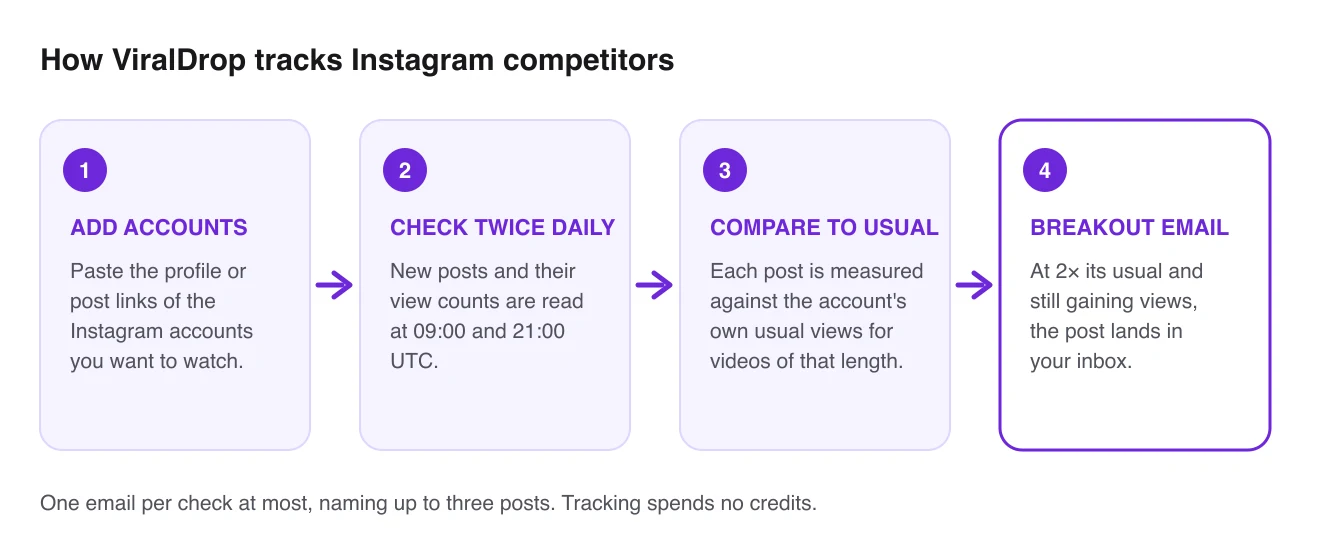
- Paste the accounts. Add the Instagram profiles of the brands and creators you measure yourself against, or a link to one of their posts.
- Twice-daily checks. Every day at 09:00 and 21:00 UTC, ViralDrop reads their new posts and the views on each.
- A normal per account. Each post is compared with that account's usual views for posts of the same length, so a big account is never judged against a small one.
- An email when it matters. When a post reaches at least twice its account's usual views and is still climbing, it goes into a breakout email.
What You Get With Instagram Competitor Tracking
A free plan that keeps tracking
Tracking comes with every plan, paid or Free, and costs no credits. On Free you can follow up to 10 accounts.
Instagram next to TikTok and YouTube
One list can hold all three platforms, so a brand's Reels and its TikToks show up side by side, and TikTok competitor tracking works the same way.
Breakouts measured against the account
Each Reel is read against its own account's history, so a small creator's hit stands out next to a big brand's routine post.
A feed you can sort
Every tracked post, ordered by how far above normal it runs, filtered by platform or length.
Alerts you can mute
Breakout emails are capped at one per check, with up to three posts in each, and a single checkbox turns them off.
The next step is one click
From any post in the feed, run an analysis of its hook and structure, or a transcript of what is said.
Instagram Competitor Analysis Template
Use this table as a template for each account you study. Each row comes from the Instagram profile or from Competitor Watch.
| What to write down | Where you find it |
|---|---|
| Account and follower count | the Instagram profile |
| Posts in the last 30 days | the profile grid |
| Share of Reels among those posts | the profile grid and Reels tab |
| Usual views for a Reel | Competitor Watch, the account's own normal |
| Best recent post, and × its usual | Competitor Watch feed, sorted by × of usual |
| Likes and comments on that post | the post, or the Competitor Watch feed |
| Its opening line or first shot | your notes, or an analysis of the post |
| Topic and call to action | your notes, or the transcript |
| What you will test from it | your decision |
Fill in one row per account every week or two. The last column is the one that matters. For scheduling and reporting around it, see the social media manager tools teams actually use.
How to Analyze Instagram Competitors
A good analysis ends in something you will post.
Choose who counts as a competitor
On Instagram, your competitors are the accounts your followers also follow for the same need. List a few direct rivals, a couple of creators your audience trusts, and one neighbouring account whose Reels you admire.
Fill in the profile columns while tracking learns
Competitor Watch labels an account as still learning until it has followed enough of its posts from the moment they were published. Meanwhile, fill in the template's profile columns by hand.
Compare Reels with the rest of the grid
Instagram accounts mix Reels, carousels and photo posts, and most put their effort into one of them. Note which format each account posts most. If a rival's carousels draw more comments than its Reels, that is worth knowing before you plan your own mix.
Look at the cover and the caption
A Reel is often seen first as a still cover in the grid or the Reels tab, with a caption under it. Write down the cover text, the caption's first line and whether a face opens the video.
Take every breakout apart
When an alert arrives, check whether the topic was new, the opening unusual, or the audio trending. An analysis of the Reel lays out its hook, structure and call to action.
Make your version, not a copy
Keep the structure that worked; replace the topic, examples and voice. Rewrite on ViralDrop starts from the Reel's link and writes scripts with the same structure for your product.
Instagram Competitor Analysis FAQ
How does ViralDrop decide an Instagram post broke out?
It sets the post's views against that account's own recent posts of the same length, never against a bigger account. At two times that normal or more, and still gaining views, the post counts as a breakout and can trigger an email.
How often are tracked accounts checked?
Every day at 09:00 and 21:00 UTC. Each check reads new posts and fresh view counts, and a breakout email follows the check when there is something to report.
Does tracking cost credits?
No. Tracking accounts spends no credits on any plan. You only use credits when you run a tool on a specific post, such as an analysis, a transcript or a download.
Is there an Instagram competitor analysis tool free to use?
Competitor Watch has a Free plan that tracks up to 10 accounts with no card, and each paid plan raises that limit. If you do not log in for a week, tracking pauses until you come back, and your data is kept.
Which platforms can I track?
Instagram, TikTok and YouTube, in one list. The feed has a filter per platform, so you can look at Instagram competitors alone or next to their accounts elsewhere.
Do I need to connect my Instagram account?
No. You add public profile or post links, and ViralDrop reads only public posts. Your own Instagram account is never connected, and you are never asked for its password.
Can I track a private Instagram account?
No. A private account's posts and views are not public, so they cannot be read or compared. Only public accounts can be added to Competitor Watch.
Can I read what a competitor's Reel says without watching it?
Yes. Open the Reel from the feed and run a transcript of the Reel, or use the Reels summarizer for a short gist and key points. Both use your credits, while the tracking that found the Reel stays free.
Can it suggest Instagram accounts to watch?
Niche discovery can. Describe your niche in a few words, review the search keywords it proposes, and it returns candidate accounts. Nothing is tracked until you approve it.
Start Tracking Instagram Competitors
Add the Instagram accounts you compete with and hear about the next breakout first.