How to Repurpose Video Content
Published September 30, 2026 · Updated September 30, 2026 · 8 min read
A single good video holds more material than one post can use. A 40-minute podcast episode has a dozen clips in it, an article, a newsletter and a carousel of key points. Knowing how to repurpose content is what turns that one recording into a week of publishing without filming anything new. The catch in 2026 is that the platforms have become strict about what counts as new. This guide covers what repurposing means, real examples, where AI helps, a workflow for one video, and the originality rules, checked on September 30, 2026.
Start with the words: paste a video link to get its transcript.
What Repurposing Video Content Means
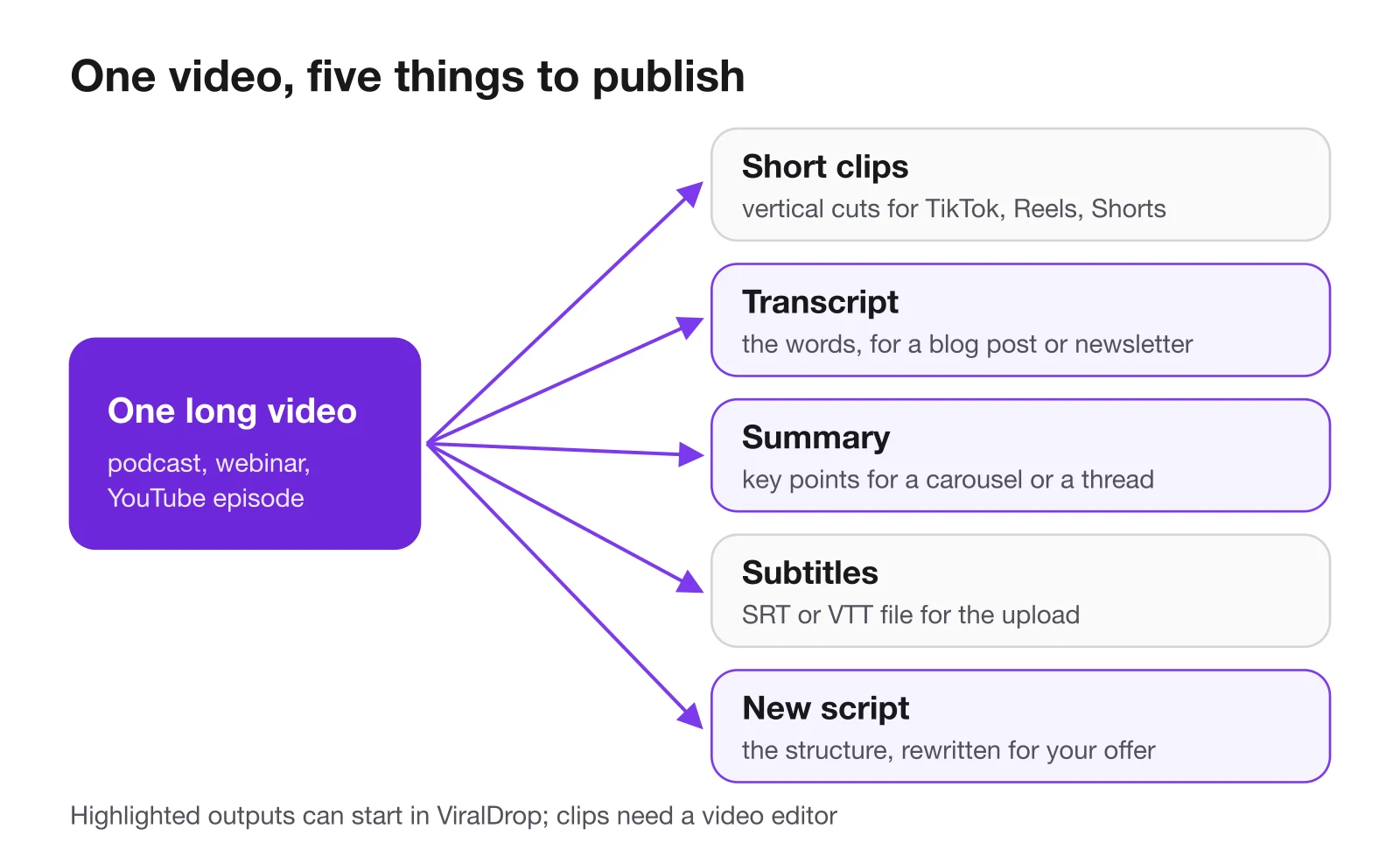
Repurposing means taking what a video says and shows, and rebuilding it for a different format or audience. A long YouTube interview becomes three vertical clips, each with its own opening. A webinar becomes a blog post written from its transcript. A tutorial becomes a carousel with one step per slide.
What it does not mean is uploading the same file to every app. That is cross-posting, and it has two problems. The video was made for one place: a landscape frame with a slow YouTube-style intro can lose TikTok viewers before it gets going. And platforms now look for reused material. Instagram says it makes Reels less visible when they carry a watermark or were already posted on Instagram, and TikTok's current guidelines keep reused material with nothing new out of the For You feed.
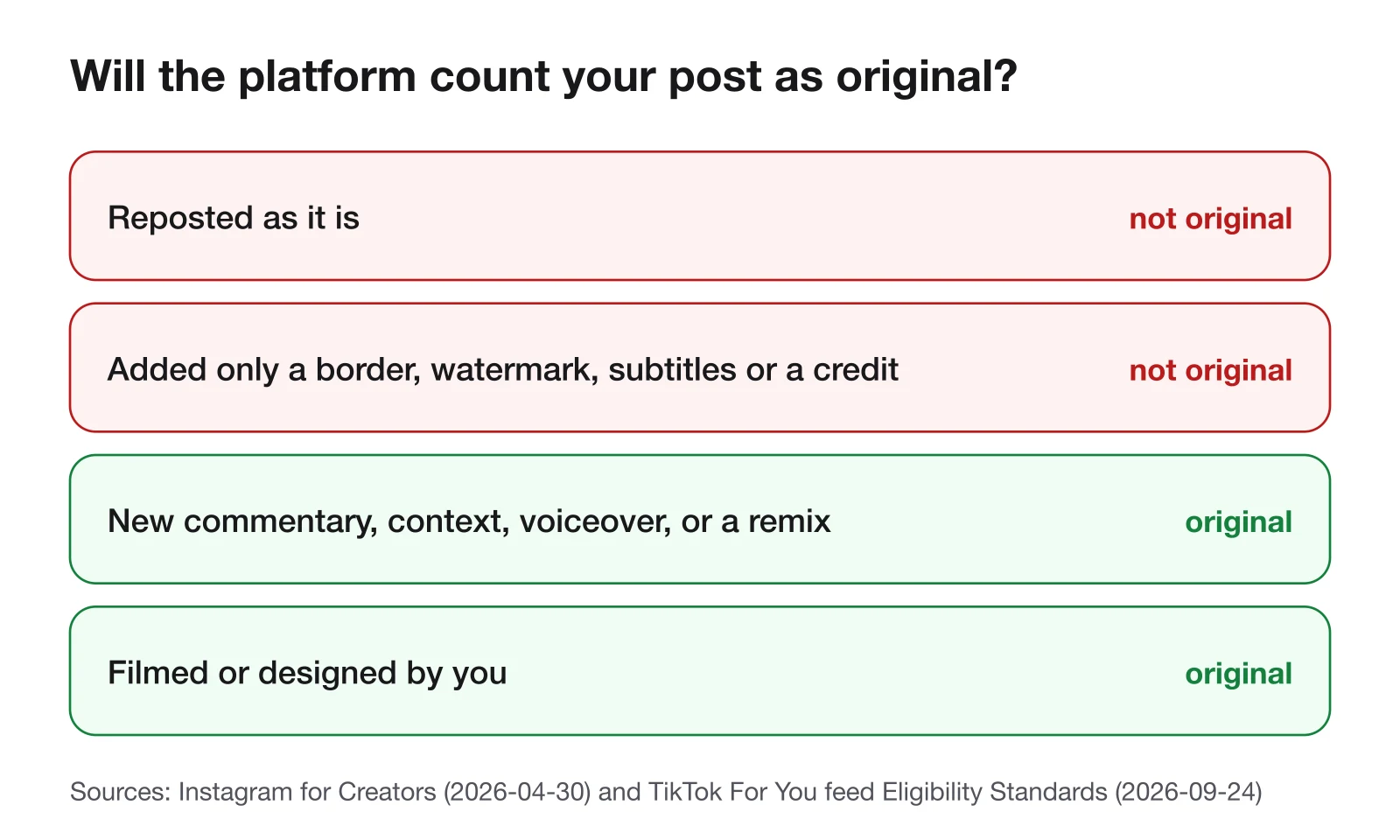
The line both platforms draw is about adding something. Your own footage, recut for a new format, is yours. Someone else's video with a caption on top is not.
Repurposing also runs in the other direction. A run of short videos on one topic, each tested on its own, can be the outline of a longer YouTube video or a guide, with the best-performing clips deciding which points lead. Short pieces are cheap experiments, and a long piece built from the winners starts with evidence behind it.
Repurpose Content Examples
Here is what one source video can become, with the part of the work that takes the time.
| Source video | What it becomes | What the work actually is |
|---|---|---|
| podcast or interview | three to five vertical clips | finding moments that make sense without the rest of the episode |
| webinar or talk | a blog post or a long LinkedIn post | turning spoken sentences into readable paragraphs |
| YouTube tutorial | a carousel with one step per slide | reducing each step to a line and a picture |
| product demo | short clips per feature, plus captioned versions | cutting, reframing and subtitling |
| any long video | a newsletter section with key points | summarising, then adding your own comment |
| a competitor's viral video | your own script with the same structure | keeping the shape, replacing every word and shot with yours |
The last row is the one people get wrong. Studying why someone else's video worked is research; reposting it is not. Taking its structure, the kind of hook, the order of the points and the type of ending, and filming your own version is how most creators learn formats. The words, the footage and the point of view have to be yours.
How to Choose What to Repurpose
Not every video deserves a second life. Repurposing takes time, so spend it on the recordings that already proved something.
Start with what performed. A video that did well against your own usual numbers has shown that its topic and its angle work for your audience. Cutting it into clips and a post extends something that is already working, instead of testing a new idea in five formats at once.
Prefer videos with several separate points. An interview with five distinct answers makes five clips. A video that builds one argument from start to finish makes one good clip and four confusing ones.
Check that it still holds up. Prices, features and advice go out of date. A tutorial for a menu that no longer exists is not worth reformatting.
Look for the moments that stand alone. A clip has to make sense to someone who never saw the rest. When you read the transcript, mark the passages that open with a clear claim or question and close within a minute or so.
Study why it worked before you cut it. If a video performed, find out which part carried it: the hook, the order of the points, the example in the middle. A ViralDrop analysis, at 5 credits for a public video up to three minutes long, breaks a short video into hook, structure and call to action. That tells you which piece to lead each clip with.
Content Repurposing AI: What It Does Well
Most of the time in repurposing is not creative. It is transcribing, finding the good parts, summarising and reformatting. That is where AI tools save the most time.
Transcripts. Speech-to-text is the foundation, because articles, captions, quotes and summaries are all built from the words. A timestamped transcript also tells an editor where each quote sits in the video.
Summaries and key points. A model can read an hour of transcript and return the main points far faster than a person can rewatch it. That is a first draft of a newsletter section or a carousel, not the final text.
Script drafts. Given a video that worked and a description of your product, a model can draft a new script that keeps the structure and changes the content.
What AI does badly is judgement. It cannot tell which moment your audience will care about, whether a clip still makes sense without the minute before it, or whether your version adds enough to count as original. Treat every AI output as a draft that a person edits.
Get the transcript first
Timestamped text from a public TikTok, Reel or YouTube link, ready to copy.
A Repurposing Workflow for One Video
This workflow takes one long video and produces a week of posts. It assumes you own the video or have permission to use it.
- Transcribe it. Get the full text with timestamps. In ViralDrop a video transcript costs 2 credits for every started 10 minutes of video, up to 120 minutes, and you can copy the text with or without timestamps or download SRT and VTT subtitle files.
- Summarise it. On the transcript, press Summarize to get a two-sentence gist and five to eight key points; on videos over ten minutes, each point carries a timestamp. A summary costs 1 credit per started 30 minutes of video.
- Mark the clips. Use the timestamped key points to find three to five moments that stand on their own. Cut them vertically in your video editor, and write a new opening line for each.
- Write the long post. Turn the transcript into an article or newsletter. Cut the filler, keep the examples, and add one thing the video did not say.
- Make the carousel. One key point per slide, in the order of the video.
- Add subtitles. Upload the SRT or VTT file with each clip, or burn the captions in, so the clip works with the sound off.
- Post the clean files. Export each clip without another app's watermark, since Instagram shows watermarked Reels less.
Steps one and two usually take the most time by hand and the least with a tool. Step three is where your judgement matters most.
After a week, compare the pieces with each other. Some clips will beat the original video, others will do nothing. The ones that worked tell you which moments to lead with next time, and which formats your audience actually wants from you.
Tools for Repurposing
A repurposing kit needs four kinds of tool, and one app rarely does all of them well.
- Transcription and summaries. ViralDrop transcribes public TikTok, Instagram Reels, YouTube and Facebook videos and summarises the transcript. It works from a link, so there is nothing to upload.
- A video editor that reframes. Cutting clips and turning a landscape frame into a vertical one is editing work; ViralDrop does not cut clips.
- Script research. ViralDrop's script rewrite takes a public video that worked and writes two scene-by-scene scripts for your product, keeping the structure that made the original perform.
- A scheduler. Posting a week of pieces on time is easier with the native schedulers in each app or a social media scheduling tool.
Pick the editor and scheduler you already know, or compare the options in our guide to content creator tools for each step of a video. The part most teams are missing is the first step, the text, because everything else is built from it.
What Changed in 2026
Instagram also spelled out what does not make a repost original: adding only a border, a watermark, subtitles, or a credit in the caption. What does count, it says, are material edits that meaningfully enhance the original, such as narration, a storyline or graphics that give it new context or more information, and its own tools like remix and collabs. For repurposing your own videos, that changes little. For accounts built on reposting other people's clips, it changes everything.
FAQ
What does it mean to repurpose video content?
It means turning one video into new pieces for other formats: clips, articles, carousels, newsletters or scripts. Each piece is rebuilt for where it will appear, rather than the same file being uploaded to every app unchanged.
What are some examples of content repurposing?
A podcast cut into vertical clips, a webinar turned into a blog post, a tutorial turned into a step-by-step carousel, and a long video summarised into a newsletter section. Each one starts from the same recording and its transcript.
Is repurposed content penalized on TikTok and Instagram?
Your own video, adapted for a new format, is not the problem. Both platforms hold back unoriginal re-uploads of other people's work, and Instagram shows watermarked or already-posted Reels less. Add something new and upload clean files.
Should I post the same video on TikTok, Reels and Shorts?
You can, if it is yours, but adapt it. Export a clean file without another app's watermark, since Instagram shows watermarked Reels less, and check that the opening, the captions and the length suit each app.
Sources
- Instagram for Creators: rewarding original creators (April 30, 2026) — checked September 30, 2026
- Instagram for Creators: original content guidelines — checked September 30, 2026
- Instagram: Instagram ranking explained (May 31, 2023) — checked September 30, 2026
- TikTok Creator Academy: understanding the originality policy — checked September 30, 2026
- TikTok Community Guidelines: For You feed eligibility standards (effective September 24, 2026) — checked September 30, 2026
Turn one video into a week of posts
Start with a timestamped transcript and a summary of its key points.
Keep reading
- Best AI Video Summarizers in 2026, Compared The best AI video summarizer for 2026 depends on the video: short-form clips, long YouTube lectures or meetings. Six tools compared from their own pages.
- Content Creator Tools: What to Use at Each Step Content creator tools for every step of a short video in 2026: research, scripting, editing, design and publishing, with prices from each official site.
- Social Media Manager Tools: The Stack That Actually Gets Used Social media manager tools that teams actually use in 2026: scheduling, analytics, design and competitor research, with prices from each official page.