Best AI Video Summarizers in 2026, Compared
Six summarizers, what each one is built for, and what it costs, checked on each official site.
Published September 30, 2026 · Updated September 30, 2026 · 11 min read
Choosing the best AI video summarizer is mostly a question of video length and platform. A tool built for a two-hour lecture on YouTube is overkill for a 40-second TikTok, and most YouTube summarizers cannot open a TikTok link at all. Meeting tools are different again: they summarize a call you took part in, not a video someone posted.
We compared six summarizers by what they are built for, what they return, where they work and what they cost. Every fact below comes from each tool's own website, opened on September 30, 2026. ViralDrop is our product; we put it first for short-form video, and its card says only what it does.
Summarize a TikTok, Reel or Short
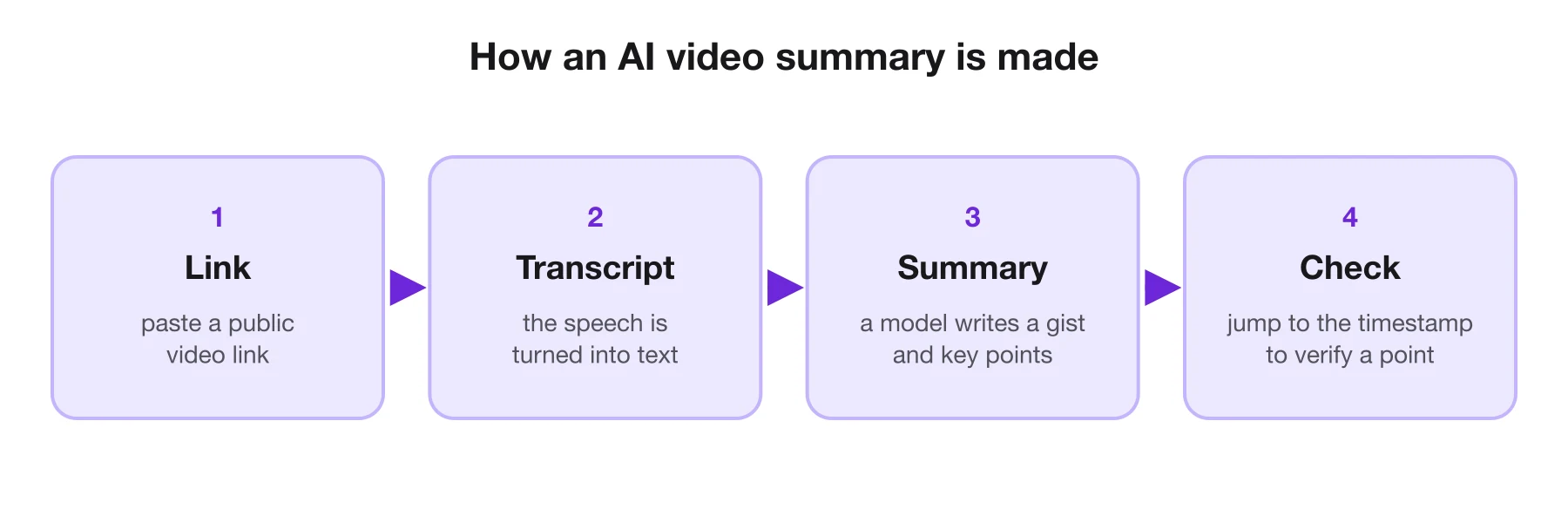
Paste a link, get the transcript, then add a summary with its key points.
AI Video Summarizers at a Glance
| Tool | Best for | What you get | Works on | Price (checked Sep 30, 2026) |
|---|---|---|---|---|
| ViralDrop | short-form videos | gist, key points, full transcript, viral breakdown | TikTok, Instagram Reels, YouTube and Shorts | 1 credit per started 30 min, plus the transcript |
| NoteGPT | long YouTube videos and playlists | summaries, mind maps, transcripts | YouTube, audio, files, web pages | free plan; Pro from $108 a year |
| Glasp | summaries beside the YouTube player | timestamped summary and transcript | YouTube, articles, PDFs | free |
| Eightify | key ideas from long YouTube videos | timestamped summary, comment overview | YouTube, in Chrome and mobile apps | see its site |
| Gemini | asking questions about a YouTube video | a chat answer | YouTube | part of the Gemini app |
| Tactiq | meeting summaries | transcripts and AI notes | Google Meet, Zoom, Microsoft Teams | free plan; Pro $8/user/mo, billed yearly |
How We Compared
We did not score these tools on accuracy, because there is no fair way to measure it across videos, languages and lengths, and we will not publish a number we cannot back up. Instead we compared what each one says it does, on its own pages:
- What it opens. Some tools only take YouTube links; others take uploads, audio or social videos.
- What it returns. A paragraph, a list of key points, timestamps, a transcript, or answers in a chat.
- Where it runs. A website, a browser extension, a mobile app or a meeting bot.
- What it costs. The free plan's real limits, and the first paid plan.
A summary is only as good as the transcript under it, so tools that transcribe the speech themselves work on videos without captions, while tools that rely on YouTube's captions depend on them being there. If a summary matters, check its key points against the transcript or the timestamp before you quote it.
What a Good Video Summary Includes
Before comparing tools, it helps to know what a useful summary looks like. Four parts separate one you can act on from a paragraph you skim and forget:
- A gist. One or two sentences that say what the video is about and what it concludes. If the gist could describe ten different videos, it is not doing its job.
- Key points in order. Five to eight points that follow the video's own structure, so you can see how the argument builds.
- Timestamps. On a long video, a timestamp beside each point lets you jump straight to the part that matters and check it. On a 30-second clip they add little, because you can simply rewatch it.
- The transcript underneath. A summary is a model's reading of the words. Having the full transcript one scroll away is what lets you confirm a quote before you use it.
Watch for summaries that add things the speaker never said, or that smooth a hedged claim into a confident one. That happens with every AI tool from time to time, which is why the transcript and the timestamps matter more than the polish of the summary itself.
Short-Form and Long-Form Need Different Summaries
A summary of a two-hour podcast saves you two hours. A summary of a 40-second TikTok saves you 40 seconds, so for short videos the value lies somewhere else.
For long videos, the job is compression: find the three ideas worth your time and the minute where each one starts. Tools built for YouTube, such as NoteGPT, Eightify and Glasp, are designed around that, with timestamps, chapters and playlist support.
For short videos, the job is usually research at scale. A marketer looking at twenty competitor Reels does not need each one compressed; they need the message of each in one line, so they can see which topics and angles keep appearing. They also want to know how each video was built, because in short-form the structure is often the reason it worked. That is why ViralDrop pairs its summary with a breakdown of the hook, structure and call to action.
1. ViralDrop: Best for Short-Form Videos
ViralDrop
Best for: summarizing TikToks, Reels and Shorts, and seeing why they went viral.
Paste a TikTok, Instagram Reel, YouTube video or Short. ViralDrop transcribes the speech, and a summary adds a two-sentence gist and five to eight key points above the full transcript. For videos longer than ten minutes, the key points carry timestamps. The summary is written in the language of your ViralDrop interface, whatever language the video is in. From the same video you can run a full analysis of its key frames, on-screen text, hook, body and call to action, which is the part a plain summary leaves out: how the video was built.
- Pros: works on short-form platforms most summarizers cannot open; summary, transcript and viral breakdown in one place; transcripts copy with or without timestamps and export to SRT or VTT.
- Cons: built for public videos with speech; no browser extension or meeting bot.
- Price: a summary costs 1 credit per started 30 minutes of video, on top of the transcript at 2 credits per started 10 minutes; plans from $9 a month; new accounts get free welcome credits.
2. NoteGPT: Best for Long YouTube Videos and Playlists
NoteGPT
Best for: students and researchers working through long YouTube videos.
NoteGPT summarizes YouTube videos and playlists from a link, and says it can batch up to 20 videos at once and summarize videos without subtitles up to 150 minutes long. Beyond video it handles audio, files and web pages, with mind maps, translation and an AI chat.
- Pros: batch and playlist summaries; many input types; a free plan.
- Cons: a broad AI suite rather than a video tool; the plans are built around credit quotas.
- Price: free plan; Pro $108 a year ($9.99 month to month), Unlimited $19.92 a month billed yearly, Max $69 a month billed yearly.
3. Glasp: Best Free Summaries Beside the Player
Glasp YouTube Summary
Best for: summarizing YouTube videos without leaving YouTube.
Glasp's browser extension for Chrome, Safari, Edge and Firefox puts a summary and the full transcript next to the video, and its web page summarizes a pasted link without installing anything. You choose ChatGPT, Claude, Gemini or Mistral, the summary length and the number of key points, and each point has a timestamp you can click. The same extension summarizes articles and PDFs, and highlights can be exported to Notion, Obsidian and other note apps.
- Pros: free; timestamps that jump the player; works on articles too.
- Cons: YouTube only for video; the timestamps beside the player need the extension.
- Price: free.
4. Eightify: Best for Key Ideas From Long Talks
Eightify
Best for: deciding whether a long video is worth watching.
Eightify extracts key ideas from YouTube videos inside YouTube, with timestamped summaries for jumping to a topic and an overview of the top comments. It runs as a Chrome extension and as iOS and Android apps.
- Pros: comment overview shows how viewers reacted; mobile apps.
- Cons: YouTube only; no public price list at the time of checking.
- Price: not listed on a public page when checked; see its site.
5. Gemini: Best for Asking Questions About a Video
Google Gemini
Best for: a quick answer about a YouTube video inside a chat you already use.
Google's help pages say Gemini Apps can find YouTube videos, playlists and channels and help you understand what a video is about, using public information from YouTube. You need to be signed in and keep Activity turned on.
- Pros: no separate tool; follow-up questions in the same chat.
- Cons: YouTube only; an answer, not a structured summary with timestamps.
- Price: part of the Gemini app.
6. Tactiq: Best for Meetings
Tactiq
Best for: summaries of calls in Google Meet, Zoom and Microsoft Teams.
Tactiq transcribes meetings through a Chrome extension or a Mac app and writes AI summaries, action items and follow-up emails. It also has a YouTube transcript tool, but its plans are built around meetings.
- Pros: made for calls you attend; integrations with note and work apps.
- Cons: not a tool for social or YouTube videos.
- Price: free plan with 10 transcripts a month; Pro $8, Team $16.67 and Business $29.17 per user a month, billed yearly.
See Why a Short Video Went Viral
A summary tells you what a video says. An analysis shows how it was built.
Summary, Transcript or Analysis: Which Do You Need?
The three outputs answer different questions, and choosing the right one saves credits and time.
| You want to know… | Use | What you get |
|---|---|---|
| what a video says, fast | a summary | a gist and key points |
| exactly what was said, word for word | a transcript | the full text, with or without timestamps |
| why a video kept people watching | an analysis | hook, body, CTA, key frames, on-screen text |
| how to make your own version | a rewrite | a new script on the same structure |
Most people start with a summary, go to the transcript when they need a quote, and use an analysis when they want to copy what worked rather than what was said.
Who Uses AI Video Summaries
Students and researchers use them to decide which lectures and talks deserve a full watch, and to turn the ones they do watch into notes. Long-video tools with timestamps and playlist support suit this best.
Marketers and social media managers use them to keep up with competitors and trends without watching every video in full. For them, the platforms matter: most competitor content lives on TikTok, Reels and Shorts, where many YouTube-only tools cannot follow.
Creators use them to research a topic before filming, and to turn their own long videos into posts, captions and newsletters. A transcript plus a summary of your own video is often the fastest first draft of everything that goes around it.
How to Summarize a Short Video With ViralDrop
The AI video summarizer page opens the tool with Summary already switched on; there are also pages for YouTube videos and TikToks.
- Copy the link. Use the Share button on the TikTok, Reel, Short or YouTube video and choose Copy link.
- Paste it into the transcript tool. When the transcript is ready, press Summarize on the result card; the button shows the price for that video's length. On ViralDrop's summarizer pages, one press runs both.
- Read the summary, then the transcript. The gist and key points sit on top; the full transcript is underneath, ready to copy or download as subtitles.
- Go further if it is worth it. Run an analysis on the same link to see the hook, structure and call to action, or a rewrite to turn it into your own script.
Before You Install a Summarizer
Browser extensions and meeting bots see more than the video. An extension that works on every page can usually read every page you open, and a meeting tool records what everyone on the call says. Check the permissions an extension asks for, and tell the other people on a call before a tool transcribes it. Website tools that work from a pasted link see only the link you give them, which makes them the easiest choice when you just need one video summarized.
Free AI Video Summarizers
Several of these tools can be used without paying, but "free" means different things:
| Tool | What the free option gives you |
|---|---|
| Glasp | the extension and its summaries, free |
| NoteGPT | a free plan, with quotas below the paid plans |
| Tactiq | 10 meeting transcripts a month and a small AI allowance |
| ViralDrop | free welcome credits for new accounts, enough for a short summary with its transcript |
| Gemini | available in the Gemini app |
For short social videos the free route is ViralDrop's welcome credits: a 10-minute video costs 2 credits to transcribe and 1 to summarize. For long YouTube videos, Glasp is the simplest free choice.
Which One to Pick
| If you mostly watch… | Pick |
|---|---|
| TikToks, Reels and Shorts | ViralDrop |
| long YouTube lectures, podcasts and playlists | NoteGPT or Eightify |
| YouTube, and you want it free beside the player | Glasp |
| a single video you want to ask about in a chat | Gemini |
| your own work meetings | Tactiq |
A marketer or creator studying competitors usually needs more than a summary. Knowing that a video "explains three money habits" is useful; knowing that it opens with a bold question, pays off every eight seconds and ends with a save prompt is what lets you make your own. That is the gap ViralDrop's analysis fills. If you only ever summarize long YouTube videos, one of the dedicated YouTube tools above will serve you better, and several of them are free.
FAQ
What is the best AI video summarizer?
It depends on the video. ViralDrop is the best fit for TikToks, Reels and Shorts, NoteGPT and Eightify for long YouTube videos, Glasp for free summaries beside the YouTube player, and Tactiq for meetings.
Is there a free AI video summarizer?
Yes. Glasp's YouTube extension is free, NoteGPT and Tactiq have free plans, and ViralDrop gives new accounts free welcome credits, which cover the transcript and summary of a short video.
Can AI summarize a TikTok video?
Yes, if the tool can open TikTok links. Most YouTube summarizers cannot. ViralDrop transcribes a public TikTok from its link and summarizes it, and it works the same way for Instagram Reels and YouTube Shorts.
How long a video can an AI summarizer handle?
Limits vary by tool and plan. ViralDrop transcribes videos up to 120 minutes and prices the summary per started 30 minutes; NoteGPT lists its own limits for videos with and without subtitles on its pricing page.
Sources
- ViralDrop pricing — checked September 30, 2026
- NoteGPT YouTube Video Summarizer — checked September 30, 2026
- NoteGPT pricing — checked September 30, 2026
- Glasp YouTube Summary — checked September 30, 2026
- Eightify — checked September 30, 2026
- Gemini Apps Help: find and ask about YouTube content — checked September 30, 2026
- Tactiq pricing — checked September 30, 2026
Keep reading
- Content Creator Tools: What to Use at Each Step Content creator tools for every step of a short video in 2026: research, scripting, editing, design and publishing, with prices from each official site.
- How to Repurpose Video Content How to repurpose video content: turn one video into clips, posts and scripts without tripping the originality rules TikTok and Instagram tightened in 2026.
- Social Media Manager Tools: The Stack That Actually Gets Used Social media manager tools that teams actually use in 2026: scheduling, analytics, design and competitor research, with prices from each official page.