YouTube Video Summarizer
A YouTube summarizer for long videos: key points with timestamps, the full transcript under them.
- Timestamped key points
- Videos and Shorts
- No captions needed
- No YouTube login
A YouTube video summarizer is most useful on the videos you would never watch end to end: the hour-long podcast, the conference talk, the tutorial with a ten-minute intro. Paste the link and ViralDrop transcribes the speech, then gives you the gist in two sentences and the key points in order. On a video longer than 10 minutes, every point carries the timestamp where it begins, so you can jump straight to the part that matters.
No link handy? Try one of these.
How to Summarize YouTube Video to Text
- Copy the link. In the YouTube app, tap Share and then Copy link. On a computer, copy the address from the browser bar. Videos and Shorts both work.
- Paste it at the top of this page. Transcript is already selected with the summary turned on, so press the button once.
- Read, then jump. Scan the key points, click through to the timestamps you care about, and use the transcript underneath for exact quotes.
What a YouTube Video Summary Looks Like
A summary opens with a two-sentence gist of the whole video. Five to eight key points follow, one sentence each, in the order they come up. On anything longer than 10 minutes, each point starts with its timestamp, which turns the list into a table of contents for the video. A Short gets the same gist and points, without the timestamps.
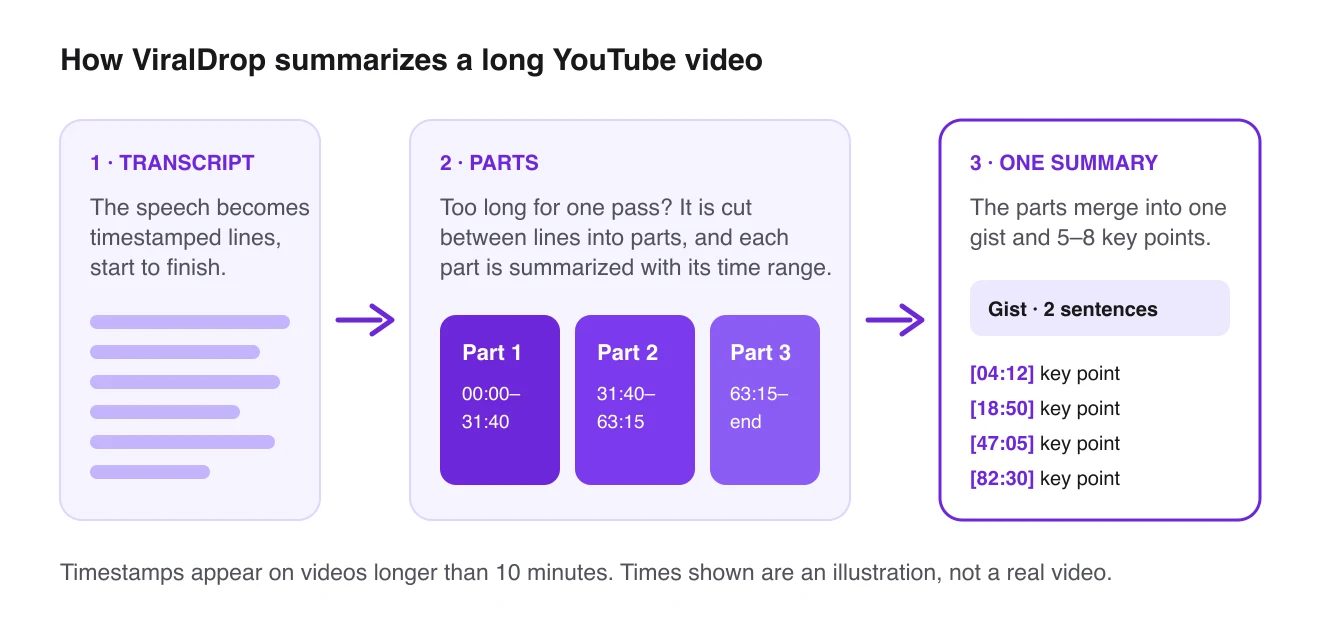
How a long video becomes one summary. The times shown are an illustration.
A long video does not get a shorter treatment. Its transcript is cut into parts between lines, each part is summarized with its own time range, and the parts are merged, so the final points cover the whole video rather than the first half hour.
Why Use ViralDrop to Summarize YouTube Videos
Free for your first videos
New accounts start with welcome credits, and the summarizer runs online, in the browser. For other tools side by side, including ones built for long lectures, see a comparison of AI video summarizers.
Works without captions
ViralDrop transcribes the audio itself, so it works on videos whose creators never added subtitles.
Timestamps that lead somewhere
On long videos every key point has a timestamp, so the summary doubles as a way to move around the video.
Priced by the half hour
The summary costs 1 credit per started 30 minutes, on top of the transcript, so a long video costs what its length says.
Summary in your language
It is written in the language you use ViralDrop in, even when the video is in another one.
Shorts included
Paste a Short and you get the same summary shape, with one click from there to an analysis of why it worked.
Who Summarizes YouTube Videos
Creators
Go through a competitor's long videos in minutes, see which topics they cover and in what order, and find the gaps worth a video of your own.
Marketers
Pull the main claims out of a product review, an interview or a webinar, with timestamps to send to a colleague who needs the proof.
Teams doing research
Summarize a playlist video by video and keep the key points in one document, with the full transcripts ready when someone asks for the exact wording.
Transcript, Analysis or Rewrite: Which Do You Need?
For a long video, the summary and transcript are usually enough. For a Short, an analysis explains the hook and structure, and a rewrite turns them into your own scripts.
- Analyze video 5 credits — Hook, structure, key frames, transcript and why it works
- Rewrite script 5 credits — The same structure, rewritten for your product and audience
- Transcribe 2 credits — Speech to clean, readable text: 2 credits per 10 minutes of video, rounded up.
- Summarize 1 credit — A gist and key points from a transcript: 1 credit per started 30 minutes of video, on top of the transcript.
- Download video 1 credit — Original MP4 saved to a share link
- Trends Research 20 credits — What’s trending in your niche across TikTok, Reels and Shorts, and what to make next
- Competitor tracking Included — Included in every plan. No credits spent.
Summarize Videos From Other Platforms
- AI video summarizer for any platform in one place
- YouTube transcript generator when you want every word, not a summary
YouTube Video Summarizer FAQ
How do I summarize a YouTube video?
Copy the video's link from Share, paste it at the top of this page and press the button. You get a two-sentence gist, five to eight key points and the full transcript below them.
Is the YouTube video summarizer free?
It starts free. You sign in and get 5 welcome credits; a video under 10 minutes costs 2 credits for the transcript and 1 for the summary. After that, plans start at $9 a month.
Do I need a YouTube account?
No. You only need the video's public link. You never sign in to YouTube or connect a channel; the one account involved is your ViralDrop account.
Is there a YouTube video summarizer without transcript or captions?
Yes. The video does not need a transcript or captions on YouTube, because ViralDrop makes its own transcript from the audio first and summarizes that. It only needs someone speaking in the video.
What does the summary include?
A two-sentence gist and five to eight key points in order. On videos over 10 minutes, each point starts with a timestamp. The full, timestamped transcript is shown under the summary.
Can I summarize a private YouTube video?
No. Private, deleted or region-blocked videos cannot be fetched. If the video cannot be reached, the credits for that run return to your balance automatically.
How much does it cost?
The transcript is 2 credits per started 10 minutes and the summary adds 1 credit per started 30 minutes. A long video costs more than a Short because both prices follow its length.
How long can the video be?
Up to 120 minutes. Longer transcripts are summarized in parts and merged, so a video near that limit still gets one gist and one list of key points covering all of it.
What language is the summary in?
The language you have ViralDrop set to, whatever language is spoken in the video. So an interview recorded in one language can be read as a summary in yours, while the transcript underneath keeps the original spoken words.
Can I summarize a YouTube Short?
Yes. A Short gets the same gist and key points, without timestamps, since it is under 10 minutes. The summary price for it is 1 credit on top of the transcript.
Summarize Any YouTube Video
Paste a YouTube link at the top of this page and get the key points in one press.