How to Download YouTube Shorts on iPhone, Android and PC
Published September 30, 2026 · Updated September 30, 2026 · 6 min read
People search for how to download YouTube Shorts on iPhone for two different reasons. Some want to watch a Short on a plane or in a tunnel. Others want the video file itself, to edit, archive or repost with permission. If you only need what is said in a Short, a YouTube Shorts transcript gives you the words as text without saving the video. YouTube handles the first case well and the second one narrowly, and the rules are the same on iPhone, Android and a computer.
This guide walks through each device, starting with YouTube's own options, checked against YouTube's help pages and Terms of Service on September 30, 2026. It ends with a table that tells you which method fits which job.
Your own Short, or one you have permission to use? Paste its link to save the file.
How to Download YouTube Shorts on iPhone
On an iPhone you have three routes. Which one to use depends on whose Short it is and where the video needs to end up.
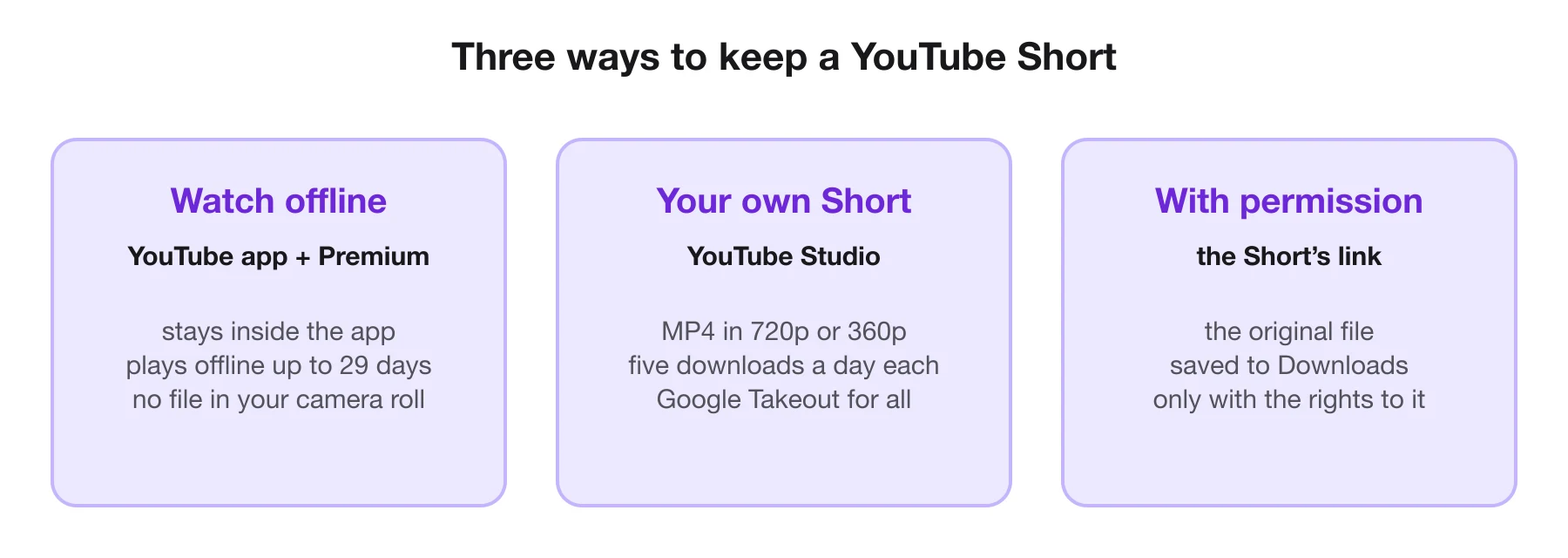
Watch offline in the YouTube app. With YouTube Premium, YouTube's help pages say you can download videos on your mobile device and watch them offline. In some countries and regions, certain videos can be downloaded without Premium. Either way, the download stays inside the YouTube app; it is not a file in your camera roll.
- Open the video in the YouTube app. Make sure you are signed in to the account with Premium.
- Tap Download. On a regular video it sits below the title; if it is not shown, look in the More menu.
- Choose a quality, if the app asks.
- Find it under You > Downloads. Downloaded videos play offline for up to 29 days before the app needs to reconnect, or 48 hours in some regions.
Your own Shorts, as a file. YouTube Studio can download MP4 copies of videos you uploaded. The steps are in the PC section below; once the file is on your computer, move it to your iPhone with AirDrop or a cloud drive.
A Short you have permission to use. Copy the Short's link from the Share button, open ViralDrop's YouTube Shorts downloader in Safari and paste it. ViralDrop saves the original video file. Safari puts it in the Downloads folder of the Files app; to move it to Photos, open it there, tap Share and choose Save Video.
How to Download YouTube Shorts on Android
Android works the same way as iPhone, with a friendlier file system at the end.
Offline in the app. YouTube Premium members, and viewers in the countries where YouTube offers free offline downloads, can tap Download below a video in the YouTube app. YouTube's help pages list a few settings worth knowing: you can limit downloads to Wi-Fi only, set a default download quality under Settings > Background & downloads, and you cannot download more when less than 5% of your storage is free.
A Short you have permission to use. Copy its link from the Share button, open ViralDrop's downloader in Chrome and paste it. The original file lands in your Downloads folder, where your gallery app will also find it. One Short costs 1 credit, paid from the welcome credits a new account starts with, and it is returned if the file cannot be fetched.
How to Download YouTube Shorts on PC
A computer gives you the most control, especially for your own channel.
Your own Shorts in YouTube Studio. YouTube's help pages describe these steps:
- Sign in to YouTube Studio.
- Select Content in the left panel.
- Open the menu next to the video and select Download.
- Save the MP4. YouTube says it comes in 720p or 360p, depending on the video.
The same page lists when the download is not available: the video was removed, it has a copyright or Community Guidelines strike, it uses a preapproved audio track, or you already downloaded it five times in the last 24 hours. To get every video you have uploaded at once, YouTube points to Google Takeout.
Offline viewing on a computer. YouTube Premium also lets you download videos from your computer in Chrome, Edge, Firefox and Opera, to watch without a connection.
A Short you have permission to use. Paste its link into ViralDrop's YouTube Shorts downloader in any browser, and the original file goes to your Downloads folder.
What YouTube Allows (and What It Doesn't)
YouTube's Terms of Service say you may not download content except as the service specifically permits, with prior written permission from YouTube and the rights holders, or as applicable law allows. In practice that gives three clear lines:
- Offline viewing in the app is allowed through the Download button, for Premium members and in the regions where YouTube offers it.
- Downloading your own uploads is allowed through YouTube Studio, and YouTube's help page adds that you cannot download other users' videos there.
- Saving someone else's Short as a file needs permission. The Terms ask for YouTube's written permission as well as the rights holder's, so a creator's yes is where it starts, not a blanket licence. A stranger's Short is not yours to keep or repost.
Use a downloader only for Shorts you own or have permission to use. The line at the bottom of every page on this site says the same.
Save Your Short as a File
Paste a Shorts link you have the rights to and get the original MP4.
Which Method to Use
| You want to… | Use | Where it ends up |
|---|---|---|
| watch a Short offline on your phone | Download in the YouTube app (Premium) | inside the YouTube app, for a limited time |
| keep a copy of a Short you uploaded | YouTube Studio on a computer | an MP4 in your Downloads folder |
| back up your whole channel | Google Takeout | an archive of every upload |
| get the file of a Short you have permission for | ViralDrop's downloader | your device's Downloads folder |
| understand why a Short worked | a ViralDrop analysis of the link | a breakdown of hook and structure |
If all you need is to rewatch something on the train, the app's own download is the right tool and costs you nothing beyond Premium. If you need the file, first make sure it is yours to take.
FAQ
Can you download YouTube Shorts to camera roll?
Not from the YouTube app: offline downloads stay inside the app. Your own Shorts can be downloaded as MP4 files from YouTube Studio and then saved to Photos, and so can a Short whose creator gave you permission.
How do I download a lot of YouTube Shorts?
For your own channel, use Google Takeout, which exports every video you uploaded in one archive. YouTube Studio downloads one video at a time, and each one only five times in 24 hours.
Can I legally download YouTube Shorts?
You can download your own uploads and use YouTube's offline feature where it is offered. YouTube's Terms do not allow downloading other people's content without permission from YouTube and the rights holder, or where the law allows it.
How to download YouTube Shorts for offline viewing?
Tap Download below the video in the YouTube app. It needs YouTube Premium in most places; some regions allow certain videos without it. Downloads play offline for up to 29 days, or 48 hours in some regions, before the app reconnects.
Why is there no Download button on some videos?
YouTube marks some videos as unavailable for offline playback, and in most regions the Download button then does not appear. It can also be missing if Premium is not active on the account you are signed in to.
Sources
- YouTube Help: watch videos offline with YouTube Premium — checked September 30, 2026
- YouTube Help: watch videos offline on mobile in select countries — checked September 30, 2026
- YouTube Help: download YouTube videos that you've uploaded — checked September 30, 2026
- YouTube Terms of Service — checked September 30, 2026
Keep reading
- Best AI Video Summarizers in 2026, Compared The best AI video summarizer for 2026 depends on the video: short-form clips, long YouTube lectures or meetings. Six tools compared from their own pages.
- Content Creator Tools: What to Use at Each Step Content creator tools for every step of a short video in 2026: research, scripting, editing, design and publishing, with prices from each official site.
- How to Go Viral on TikTok How to go viral on TikTok in 2026: what TikTok says it rewards, why followers matter less than you think, and how to study the videos that worked.